
Lỗi thiếu Emulator64.dll khi chơi Wargroove
M đã thử tải lại file, cài lại, chạy bằng launcher mà vẫn bị lỗi. Chạy Visual C++ all in one r nhưng vẫn bị. Đã tắt Defender trong lúc chạy, ko hiểu sao. Trong folder install-cr v install-cr2 thì có thấy file dll.
Spec: i5 9400F - RX6700XT - 32GB RAM - Win 11 x64
Update: Đã tìm ra nguyên nhân!
Hên là m còn giữ file cũ của game này, lấy file cũ này Wargroove.v2.1.7_LinkNeverDie.Com chạy thì ko sao mà tải file mới về giải nén thì bị Wargroove.v2.1.7.rp_LinkNeverDie.Com.
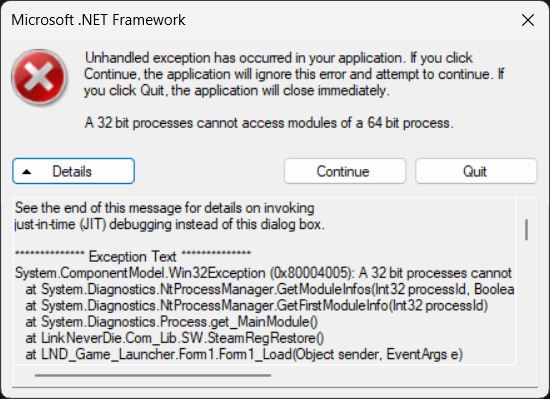
A 32 bit processes cannot access modules of a 64 bit process.
wargroove64.exe - System Error
The code execution cannot proceed because Emulator64.DLL was not found. Reinstalling the program may fix this problem.
Error Code
See the end of this message for details on invoking
just-in-time (JIT) debugging instead of this dialog box.
************** Exception Text **************
System.ComponentModel.Win32Exception (0x80004005): A 32 bit processes cannot access modules of a 64 bit process.
at System.Diagnostics.NtProcessManager.GetModuleInfos(Int32 processId, Boolean firstModuleOnly)
at System.Diagnostics.NtProcessManager.GetFirstModuleInfo(Int32 processId)
at System.Diagnostics.Process.get_MainModule()
at LinkNeverDie.Com_Lib.SW.SteamRegRestore()
at LND_Game_Launcher.Form1.Form1_Load(Object sender, EventArgs e)
at System.EventHandler.Invoke(Object sender, EventArgs e)
at System.Windows.Forms.Form.OnLoad(EventArgs e)
at System.Windows.Forms.Form.OnCreateControl()
at System.Windows.Forms.Control.CreateControl(Boolean fIgnoreVisible)
at System.Windows.Forms.Control.CreateControl()
at System.Windows.Forms.Control.WmShowWindow(Message& m)
at System.Windows.Forms.Control.WndProc(Message& m)
at System.Windows.Forms.ScrollableControl.WndProc(Message& m)
at System.Windows.Forms.ContainerControl.WndProc(Message& m)
at System.Windows.Forms.Form.WmShowWindow(Message& m)
at System.Windows.Forms.Form.WndProc(Message& m)
at System.Windows.Forms.Control.ControlNativeWindow.OnMessage(Message& m)
at System.Windows.Forms.Control.ControlNativeWindow.WndProc(Message& m)
at System.Windows.Forms.NativeWindow.Callback(IntPtr hWnd, Int32 msg, IntPtr wparam, IntPtr lparam)
************** Loaded Assemblies **************
mscorlib
Assembly Version: 4.0.0.0
Win32 Version: 4.8.9282.0 built by: NET481REL1LAST_C
CodeBase: file:///C:/Windows/Microsoft.NET/Framework/v4.0.30319/mscorlib.dll
----------------------------------------
LND Game Launcher
Assembly Version: 1.0.0.0
Win32 Version: 1.0.0.0
CodeBase: file:///H:/Game2/Wargroove.v2.1.7.rp_LinkNeverDie.Com/_Wargroove%20-%20LND%20Game%20Launcher.exe
----------------------------------------
Microsoft.VisualBasic
Assembly Version: 10.0.0.0
Win32 Version: 14.8.9032.0 built by: NET481REL1
CodeBase: file:///C:/Windows/Microsoft.Net/assembly/GAC_MSIL/Microsoft.VisualBasic/v4.0_10.0.0.0__b03f5f7f11d50a3a/Microsoft.VisualBasic.dll
----------------------------------------
System.Windows.Forms
Assembly Version: 4.0.0.0
Win32 Version: 4.8.9251.0 built by: NET481REL1LAST_C
CodeBase: file:///C:/Windows/Microsoft.Net/assembly/GAC_MSIL/System.Windows.Forms/v4.0_4.0.0.0__b77a5c561934e089/System.Windows.Forms.dll
----------------------------------------
System
Assembly Version: 4.0.0.0
Win32 Version: 4.8.9282.0 built by: NET481REL1LAST_C
CodeBase: file:///C:/Windows/Microsoft.Net/assembly/GAC_MSIL/System/v4.0_4.0.0.0__b77a5c561934e089/System.dll
----------------------------------------
System.Drawing
Assembly Version: 4.0.0.0
Win32 Version: 4.8.9032.0 built by: NET481REL1
CodeBase: file:///C:/Windows/Microsoft.Net/assembly/GAC_MSIL/System.Drawing/v4.0_4.0.0.0__b03f5f7f11d50a3a/System.Drawing.dll
----------------------------------------
System.Configuration
Assembly Version: 4.0.0.0
Win32 Version: 4.8.9032.0 built by: NET481REL1
CodeBase: file:///C:/Windows/Microsoft.Net/assembly/GAC_MSIL/System.Configuration/v4.0_4.0.0.0__b03f5f7f11d50a3a/System.Configuration.dll
----------------------------------------
System.Core
Assembly Version: 4.0.0.0
Win32 Version: 4.8.9277.0 built by: NET481REL1LAST_B
CodeBase: file:///C:/Windows/Microsoft.Net/assembly/GAC_MSIL/System.Core/v4.0_4.0.0.0__b77a5c561934e089/System.Core.dll
----------------------------------------
System.Xml
Assembly Version: 4.0.0.0
Win32 Version: 4.8.9032.0 built by: NET481REL1
CodeBase: file:///C:/Windows/Microsoft.Net/assembly/GAC_MSIL/System.Xml/v4.0_4.0.0.0__b77a5c561934e089/System.Xml.dll
----------------------------------------
Accessibility
Assembly Version: 4.0.0.0
Win32 Version: 4.8.9032.0 built by: NET481REL1
CodeBase: file:///C:/Windows/Microsoft.Net/assembly/GAC_MSIL/Accessibility/v4.0_4.0.0.0__b03f5f7f11d50a3a/Accessibility.dll
----------------------------------------
System.Runtime.Remoting
Assembly Version: 4.0.0.0
Win32 Version: 4.8.9214.0 built by: NET481REL1LAST_B
CodeBase: file:///C:/Windows/Microsoft.Net/assembly/GAC_MSIL/System.Runtime.Remoting/v4.0_4.0.0.0__b77a5c561934e089/System.Runtime.Remoting.dll
----------------------------------------
LinkNeverDie.Com_Lib
Assembly Version: 1.0.0.0
Win32 Version: 1.0.0.0
CodeBase: file:///H:/Game2/Wargroove.v2.1.7.rp_LinkNeverDie.Com/LinkNeverDie.Com_Lib.DLL
----------------------------------------
aQfFfhcljyPIntMcEhCAjzhEnlQH
Assembly Version: 0.0.0.0
Win32 Version: 1.0.0.0
CodeBase: file:///H:/Game2/Wargroove.v2.1.7.rp_LinkNeverDie.Com/LinkNeverDie.Com_Lib.dll
----------------------------------------
************** JIT Debugging **************
To enable just-in-time (JIT) debugging, the .config file for this
application or computer (machine.config) must have the
jitDebugging value set in the system.windows.forms section.
The application must also be compiled with debugging
enabled.
For example:
<configuration>
<system.windows.forms jitDebugging="true" />
</configuration>
When JIT debugging is enabled, any unhandled exception
will be sent to the JIT debugger registered on the computer
rather than be handled by this dialog box.
Các bài viết liên quan:
-
Pummel Party: Lỗi game không vào được
-
Lỗi thiếu dll Rabbit and Steel
-
Lethal Company - Has dlls that cannot be loaded
-
lỗi thiếu file voices38.dll Sonic Frontiers
-
Hogwarts Legacy báo thiếu steam api64
-
Taiko no Tatsujin: Rhythm Festival bị lỗi văng game
-
Lỗi D3Dcompiler_43 DLL was not found (FIXED)
-
Bảng Console đã mở nhưng game không chạy
-
Lỗi game Total War Three Kingdom
-
Mình giải nén rồi nhưng chạy thi nó báo lỗi thiếu steamapi64.dll gì đó?
- Xem thêm nhiều bài hơn

-

xử lý kiểu gì v trời
đọc hòm thư admin bá có gửi cách fix rồi mà bạn-
@Toi Da Trang Này là t quên ông admin đăng cách fix trong hòm thư. Tại tải mấy game về r mà chạy bth ko bị gì nên quên vụ đó.
T vô tình còn giữ file game cũ nên giải nén ra là chạy đc :)))))
T coi hòm thư xong fix đc, làm phiền bác r
-
1434
2