
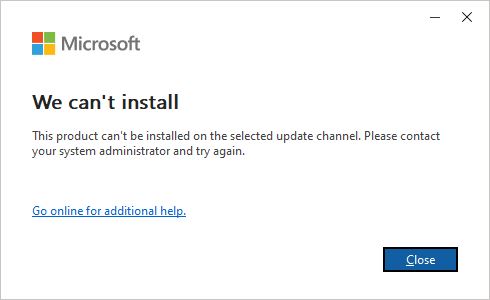
Lỗi cài đặt office 365 - can't be installed on the selected update channel
Dạ hiện tại em gặp lỗi về việc cài đặt office 365. Trước đó em có cài office 2019 bên Linkneverdie bằng tool tự động, sau đó nhớ ra là mình có tài khoản office 365 nên em đã xóa đi bản office 2019 từ Linkneverdie (sử dụng cách force uninstall trong tool). Tuy nhiên, sau khi chạy file setup của Office 365 thì bị lỗi như hình. HIện giờ em phải làm như thế nào ạ?
Em xin cảm ơn mọi người nhiều.
Các bài viết liên quan:
-
Lỗi tmodloader onlinesteam không tìm thấy đường dẫn dù thư mục đã đúng
-
Không chạy được Forza Horizon 4
-
Lỗi Game Runtime is not installed - Game Mixtape
-
Lỗi khi cài việt hóa
-
[Hướng dẫn] Chuyển Microsoft Office 32bit sang 64bit
-
Crash game vào lại thì loader báo lỗi
-
Word, Excel, Powerpoint thông báo Microsoft Office LTSC Professional Plus 2024 Preview has expired
-
Microsoft office không cài được
-
Không thể cài đặt .Net Framework 4.8
-
Gặp lỗi window cannot be installed to this disk
- Xem thêm nhiều bài hơn

-

Tui đoán là gỡ không hết file, còn dính file cũ nên bị lỗi. Có 2 cách:
Xem thêm
1. Cài lại win. Nhanh gọn lẹ nhưng tốn thời gian.
2. Sử dụng một số cleaner tools khác.
2.1. Uninstall Office automatically from Microsoft.
(https://support.microsoft.com/en-us/office/uninstall-office-automatically-9ad57b43-fa12-859a-9cf0-b694637b3b05)
HOẶC
2.2. Microsoft Office Removal Tool
(https://github.com/Admonstrator/msoffice-removal-tool)
HOẶC
2.3. Office Uninstall Ratiborus
(Tự Google, này tui không chắc.)
Lưu ý là tui chưa test qua, chỉ mới Google nên bạn xài cần thận (nhứt là cái thứ 3).-

@Trần Thiên Gia Phước Dạ em xin cảm ơn !
-
5529
2